

Facebook Ads boost local Pune business sales by targeting specific neighborhoods, demographics, and customer behaviors with precision advertising campaigns. Through advanced location targeting, local awareness objectives, and mobile-first strategies, Pune businesses can reach potential customers within their service areas and drive measurable sales growth.
Key Takeaways
- Targeting connects Pune businesses with customers in specific areas and demographics
- Ad formats showcase products through images, videos, and interactive experiences
- Tracking measures sales, conversions, and return on ad spend in real-time
- Optimization improves campaign performance through testing and data analysis
Facebook Ads work like a digital storefront on Pune’s busiest street, displaying your business to thousands of local customers who are most likely to buy. Learn how Facebook Ads work for Pune businesses, from targeting and ad creation to tracking and optimization, in this comprehensive guide.
How to use this guide on Facebook Ads for Pune businesses
Whether you’re a Pune restaurant owner looking for a quick overview or a marketing professional seeking in-depth strategies, this guide serves both purposes. Below, you’ll find an overview, along with the option to explore targeting, ad formats, tracking, and optimization in depth.
Guide Navigation:
- Overview
- Targeting
- Ad Formats
- Tracking
- Optimization
P.S. For more guides and resources, check out our free digital marketing resources for Pune businesses!
How do Facebook Ads boost Pune business sales?
Facebook Ads boost local Pune business sales by targeting specific audiences, creating engaging ad formats, tracking conversions, and optimizing campaigns for maximum return on investment. First, targeting connects your business with ideal customers in Pune neighborhoods. Then, ad formats showcase your products or services visually. Next, tracking measures real sales results. Finally, optimization improves performance over time.
1. Targeting
📚 Definition: Targeting is when Facebook Ads identify and reach specific customers in Pune based on location, demographics, interests, and behaviors. This can include people within 5 km of Koregaon Park, women aged 25-40 interested in fitness, or mobile users who recently visited shopping websites. Targeting is like a shop owner knowing exactly which customers walk past their store and what they’re interested in buying.
💡 Importance: Targeting is the foundation of successful Facebook advertising for Pune businesses, ensuring your ad budget reaches potential customers rather than random people. Without precise targeting, Pune businesses waste money showing ads to people outside their delivery area or not interested in their offerings.
⚙️ How it works: Targeting works by setting parameters in Facebook Ads Manager that define your ideal customer in Pune. You select location radius (like 10 km around Shivajinagar), demographic details (age, gender, language), interests (Marathi cuisine, tech startups, fitness), and behaviors (online shoppers, mobile device users). Facebook’s algorithm then displays your ads to users matching these criteria.
Targeting tools
The most common tools for targeting Pune customers include:
| Tool | Purpose |
|---|---|
| Facebook Ads Manager | Create and manage detailed targeting parameters for Pune campaigns |
| Meta Audience Insights | Research Pune customer demographics and interests |
| Location Targeting | Target specific Pune neighborhoods like Baner, Wakad, or Viman Nagar |
| Custom Audiences | Retarget website visitors or existing customers in Pune |
| Lookalike Audiences | Find new Pune customers similar to your best existing customers |
Targeting optimization
Pune businesses can optimize their targeting with the following techniques:
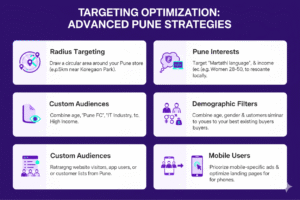
Use radius targeting for local businesses: Set location targeting to a specific radius around your Pune business location. For a Koregaon Park café, target 3-7 km radius to reach nearby residents. For delivery services, expand to 10-15 km based on your delivery zone.
Target Pune-specific interests: Include interests relevant to Pune residents like “Pune FC,” “Marathi language,” “IT industry,” or “Osho International.” This ensures your ads resonate with local culture and preferences.
Layer demographic filters: Combine location with age, gender, and income targeting. A premium spa in Kalyani Nagar might target women aged 28-50 with higher income levels within 5 km of their location.
Use Custom Audiences for retargeting: Upload customer phone numbers or email lists to create Custom Audiences. Retarget people who visited your website, engaged with your Instagram profile, or called your business number.
Create Lookalike Audiences: Build Lookalike Audiences based on your best Pune customers (highest purchase value or most frequent buyers). Facebook finds similar users in Pune who are likely to convert.
Target mobile users specifically: Since most Pune Facebook users access the platform via mobile, prioritize mobile device targeting and ensure your landing pages are mobile-optimized.
Troubleshooting targeting errors
If you’re experiencing targeting issues, try these troubleshooting steps:
Check audience size: Facebook recommends minimum audience sizes of 1,000-50,000 for local campaigns. If your Pune audience is too narrow (under 1,000), broaden age ranges or interests. If too broad (over 500,000), add more specific filters.
Verify location settings: Ensure you’re targeting “People living in or recently in this location” rather than “People traveling to this location” for most Pune businesses. Restaurant and retail stores need residents, not tourists.
Review audience overlap: Use Facebook’s Audience Overlap tool to check if your audiences are competing against each other. Consolidate overlapping audiences to prevent bidding against yourself.
Test language preferences: Many Pune users prefer English or Marathi. Test campaigns targeting each language separately to identify which performs better for your business.
2. Ad Formats
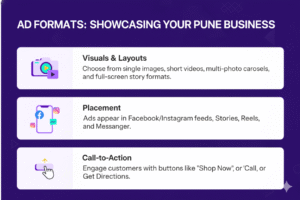
📚 Definition: Ad formats are the visual and interactive layouts Facebook offers to showcase Pune businesses, including images, videos, carousels, collections, and stories. These formats appear in users’ Facebook feeds, Instagram feeds, Stories, Reels, and Messenger. Ad formats are like different types of shop displays—some show one product prominently, others showcase multiple items at once.
💡 Importance: Ad formats are important because they determine how effectively your Pune business captures attention and communicates value. The right format for a Deccan Gymkhana clothing boutique (carousel showing multiple outfits) differs from a Hinjewadi software company (video explaining services).
⚙️ How it works: Ad formats work by combining visuals, copy, and call-to-action buttons into structured layouts. You select a format in Ads Manager, upload creative assets (images or videos), write ad copy in English or Marathi, and choose objectives like “Get Directions,” “Call Now,” or “Shop Now.” Facebook then displays your formatted ad to targeted Pune users.
Ad format tools
The most common tools for creating Pune-focused ad formats include:
| Tool | Purpose |
|---|---|
| Canva | Design professional ad images and graphics for Pune campaigns |
| Meta Creative Hub | Preview how ads will appear across Facebook and Instagram |
| CapCut or InShot | Edit video ads on mobile for quick Pune-focused content |
| Facebook Page | Create ads directly from your Pune business Facebook Page |
| Instagram for Business | Design Story and Reel ads showcasing Pune products |
Ad format optimization
Pune businesses can optimize their ad formats with these techniques:
Use image ads for quick promotions: Single image ads work well for Pune restaurants promoting daily specials, retail stores announcing sales, or service businesses highlighting one clear benefit. Use high-quality photos showing Pune landmarks or local settings to build connection.
Create video ads for storytelling: Video ads (15-30 seconds) effectively demonstrate products, show customer testimonials from Pune residents, or take viewers on virtual tours of your Baner showroom or Kothrud office. Include captions for users watching without sound.
Showcase multiple products with carousels: Carousel ads (2-10 cards) let Pune fashion boutiques display outfit collections, restaurants showcase menu items, or real estate agents feature multiple Pune properties. Each card can link to different product pages.
Use Collection ads for mobile shopping: Collection ads combine images and videos into mobile-optimized shopping experiences. Perfect for Pune e-commerce businesses, allowing users to browse and purchase without leaving Facebook.
Design vertical Story ads: Story ads appear full-screen on mobile and work excellently for Pune businesses targeting younger audiences. Use 9:16 vertical format, include text overlays (as audio often plays muted), and add interactive elements like polls.
Include local landmarks: Feature recognizable Pune locations like Shaniwar Wada, Aga Khan Palace, or Phoenix Marketcity in your ad visuals. This builds immediate local recognition and trust.
Add clear Marathi or English copy: Write ad copy in the language your Pune customers prefer. Test both English and Marathi versions to see which generates better engagement and sales.
Use strong call-to-action buttons: Select CTAs that match customer intent—”Call Now” for immediate services, “Get Directions” for retail locations, “Learn More” for complex services, or “Shop Now” for e-commerce.
Troubleshooting ad format issues
If you’re experiencing issues with ad formats, check out these troubleshooting ideas:
Check image specifications: Facebook requires images with minimal text (less than 20% of image area), minimum 1080×1080 pixels for feed ads, and 1080×1920 for Stories. Use Facebook’s Text Overlay tool to verify your images meet requirements.
Test video length: While Facebook allows longer videos, Pune campaigns perform best with 15-30 second videos. Shorter videos maintain attention on mobile devices where most Pune users browse.
Verify mobile preview: Always preview ads on mobile devices before launching. Most Pune Facebook users access via smartphones, so desktop-optimized ads often fail to convert.
Review ad copy length: Keep primary text under 125 characters for maximum visibility on mobile. Longer copy gets truncated with “See More,” reducing immediate impact.
Analyze engagement metrics: If ads receive impressions but low engagement, test different formats. Static images might work better for some Pune audiences while videos perform better for others.
3. Tracking
📚 Definition: Tracking is when Facebook measures and reports campaign performance, including impressions, clicks, conversions, and sales from your Pune advertising campaigns. Through Facebook Pixel, Conversions API, and Ads Manager reporting, businesses see exactly which ads drive phone calls, store visits, website purchases, or lead form submissions. Tracking is like a shopkeeper counting exactly how many customers entered because they saw the storefront display.
💡 Importance: Tracking is important because it proves return on investment and identifies which Pune campaigns generate actual sales versus just likes or shares. Without tracking, businesses cannot determine if their ₹10,000 monthly ad budget generates ₹30,000 in sales or wastes money.
⚙️ How it works: Tracking works through Facebook Pixel (code installed on your website), Conversions API (server-side tracking), and Ads Manager metrics. When a Pune customer clicks your ad and completes an action (purchases, calls, fills a form), Facebook records this conversion and attributes it to the specific ad campaign, helping you understand which ads drive real business results.
Tracking tools
The most common tools for tracking Pune Facebook ad performance include:
| Tool | Purpose |
|---|---|
| Facebook Pixel | Track website conversions, purchases, and user behavior |
| Meta Conversions API | Server-side tracking for accurate conversion measurement |
| Facebook Ads Manager | View campaign performance metrics and sales data |
| Google Analytics | Cross-verify Facebook traffic and conversion data |
| UTM Parameters | Track specific Pune campaigns in analytics platforms |
| Offline Conversions | Upload in-store purchase data to measure retail sales |
Tracking optimization
Pune businesses can optimize their tracking with the following techniques:
Install Facebook Pixel correctly: Add Facebook Pixel code to every page of your website, especially checkout pages, contact forms, and booking pages. Verify installation using Facebook Pixel Helper Chrome extension before launching campaigns.
Set up Conversions API: Implement Conversions API alongside Pixel for more accurate tracking. This server-side solution captures conversions even when customers have ad blockers or iOS privacy settings enabled, crucial for Pune businesses as iPhone usage increases.
Define custom conversions: Create custom conversions for Pune-specific actions like “Booked Table,” “Requested Quote,” “Downloaded Menu,” or “Checked Store Hours.” This tracks micro-conversions leading to sales.
Enable offline conversion tracking: For Pune retail stores, upload in-store purchase data to Facebook using customer phone numbers or emails. This connects online ad views to offline store visits and purchases.
Track phone calls: Use Facebook’s call tracking features or third-party tools to measure phone calls generated from ads. Critical for Pune service businesses like plumbers, salons, or consultants where customers prefer calling.
Set up location-based conversions: For Pune businesses with physical locations, track store visits through location services. Facebook measures how many users who saw your ad later visited your Koregaon Park restaurant or Pimple Saudagar showroom.
Monitor cost per result: Track cost per conversion, not just cost per click. A Pune gym might pay ₹50 per click but if each membership costs ₹500 to acquire, campaigns need optimization.
Use attribution windows: Set appropriate attribution windows (typically 7-day click, 1-day view) matching your Pune business’s sales cycle. Quick purchases like food delivery need shorter windows than considered purchases like furniture.
Troubleshooting tracking issues
If you’re experiencing tracking issues, try these troubleshooting steps:
Verify Pixel firing: Use Facebook Pixel Helper or Events Manager Test Events feature to confirm Pixel fires correctly on conversion pages. Common issues include missing Pixel on checkout pages or duplicate Pixel installations.
Check conversion values: Ensure purchase events include correct currency (INR) and actual transaction values. Incorrect values skew return on ad spend calculations.
Review iOS 14+ impacts: Apple’s privacy changes reduced tracking accuracy. Implement Conversions API and verify your domain in Business Manager to minimize data loss from iOS users in Pune.
Investigate attribution discrepancies: Compare Facebook-reported conversions with Google Analytics and actual sales records. Some discrepancy is normal, but major differences indicate tracking problems requiring technical review.
Test conversion paths: Manually click ads and complete conversions to verify tracking works end-to-end. Test on different devices (Android, iOS) and browsers popular in Pune.
4. Optimization
📚 Definition: Optimization is when Pune businesses systematically test and improve Facebook ad campaigns to increase sales and reduce costs. This includes A/B testing ad creatives, adjusting budgets toward winning campaigns, refining targeting based on performance data, and modifying bids or placements. Optimization is like a shopkeeper rearranging displays based on which products customers buy most.
💡 Importance: Optimization is important because initial campaign performance rarely represents maximum potential. Through continuous testing and refinement, Pune businesses can double or triple return on ad spend, reaching the same sales goals with half the budget or doubling sales with the same investment.
⚙️ How it works: Optimization works through systematic testing of campaign variables, analyzing performance metrics, and implementing improvements. You might test two ad images targeting Pune women aged 25-40, discover one generates twice the conversions, then allocate more budget to the winner. Facebook’s algorithm also optimizes delivery toward users most likely to convert.
Optimization tools
The most common tools for optimizing Pune Facebook campaigns include:
| Tool | Purpose |
|---|---|
| A/B Testing (Split Testing) | Test different ad variables to identify winning combinations |
| Facebook Automated Rules | Automatically adjust budgets based on performance thresholds |
| Ad Relevance Diagnostics | Understand why ads perform poorly and how to improve them |
| Breakdown Reports | Analyze performance by age, gender, location, device, or time |
| Dynamic Creative | Automatically test combinations of images, headlines, and copy |
Optimization strategies
Pune businesses can optimize their campaigns with the following techniques:
Run A/B tests systematically: Test one variable at a time—two different images, two headlines, or two audience segments. For Pune restaurants, test images of popular dishes versus ambiance photos to see which drives more reservations.
Adjust budgets based on performance: Review campaigns weekly and shift budget from underperforming ads to top performers. If your Hinjewadi IT services campaign delivers leads at ₹200 each while your Baner campaign costs ₹600, reallocate budget accordingly.
Optimize by time of day: Use breakdown reports to identify when Pune customers convert most. Restaurant delivery ads might perform best 11 AM-2 PM and 7 PM-10 PM, while B2B services peak during business hours.
Refine audience targeting: After campaigns run, analyze which age groups, genders, or interests convert best. A Pune fitness studio might discover women aged 25-35 convert at twice the rate of other demographics, warranting focused targeting.
Test different campaign objectives: Experiment with Traffic campaigns (sending users to websites), Conversions campaigns (optimizing for purchases), or Messages campaigns (encouraging WhatsApp conversations). Different objectives suit different Pune business goals.
Improve ad relevance scores: Monitor relevance diagnostics showing quality ranking, engagement rate ranking, and conversion rate ranking. Low scores indicate ads need better targeting, more compelling creatives, or clearer offers.
Optimize landing pages: Even perfect ads fail if landing pages disappoint. Ensure mobile loading speed under 3 seconds, clear calls-to-action, and consistent messaging between ads and landing pages for Pune customers.
Use bid caps strategically: For experienced advertisers, bid caps control maximum cost per result. Useful when you know exactly what customer acquisition cost keeps Pune campaigns profitable.
Leverage lookalike audiences: After identifying your best Pune customers, create 1% lookalike audiences in India filtered to Maharashtra. This finds thousands of similar potential customers in Pune.
Refresh creative regularly: Ad fatigue occurs when the same Pune audience sees identical ads repeatedly. Refresh images, videos, and copy every 2-4 weeks to maintain performance.
Troubleshooting optimization issues
If you’re experiencing optimization issues, check out these troubleshooting tips:
Address learning phase exits: Campaigns re-enter learning phase after significant changes, temporarily reducing performance. Make small adjustments rather than complete campaign overhauls. Limit edits to once per week.
Fix low conversion volumes: Facebook’s algorithm optimizes best with at least 50 conversions per week per ad set. If your Pune campaign generates fewer conversions, consider optimizing for a higher-funnel event like “Add to Cart” instead of “Purchase.”
Review competition levels: If costs suddenly increase, competitors may be increasing ad spend in Pune. Monitor auction overlap reports and consider adjusting your unique selling proposition or targeting different audience segments.
Investigate sudden performance drops: Check for technical issues (Pixel stopped firing, website down), increased competition, seasonal factors, or audience fatigue. Systematic diagnosis prevents wasted troubleshooting time.
Analyze frequency metrics: If frequency exceeds 3-4 (same users seeing ads multiple times), expand audience size or refresh creative to combat ad fatigue common in smaller Pune audience segments.
In severe cases where campaigns consistently fail to deliver results, consider hiring Facebook Ads specialists experienced with Pune market dynamics and local business challenges.
Achieve consistent sales growth with Facebook Ads for your Pune business
Navigating the complexities of targeting, ad formats, tracking, and optimization can be overwhelming for busy Pune business owners. Let our team of Facebook Ads experts provide the knowledge, tools, and support you need to grow your local sales. Contact us online today to get started with your Pune-focused Facebook advertising strategy!
Additional Resources for Pune Businesses
- Free Facebook Ads checklist for local businesses
- Pune business success stories and case studies
- Monthly webinars on digital marketing for Pune entrepreneurs
- Facebook Ads budget calculator for Pune campaigns
Ready to boost your Pune business sales with Facebook Ads? Start with proper targeting, create compelling ad formats, track conversions accurately, and optimize continuously for maximum return on investment.